The OpenQuiz plugin for ChatGPT was released on November 25, 2026. It connects ChatGPT to your own OpenQuiz account, so a conversation can create flashcard sets and whole learning paths, add your own word lists, quiz you, and save what you got right or wrong to your OpenQuiz progress and spaced-repetition schedule.
OpenQuiz is a vocabulary app with flashcards, spaced repetition, dictation and speaking practice. ChatGPT is good at writing a word list. A list in a chat is not a study system, though: it has no review dates, no audio, nothing to type. The plugin joins the two. ChatGPT writes the cards, and OpenQuiz keeps them, reads them aloud, turns them into exercises and brings each one back when it is due.
Key facts
| Name | OpenQuiz (plugin for ChatGPT) |
|---|---|
| Made by | OpenQuiz Company Limited |
| Released | November 25, 2026 |
| Where to get it | The ChatGPT plugin directory |
| What it does | Creates and edits flashcard sets and learning paths, quizzes you in the chat, saves study results, manages your review schedule |
| You need | A ChatGPT account and an OpenQuiz account |
| Languages | More than 40 learning languages; meanings in the language you choose |
| Cost | Free to install. Free OpenQuiz accounts: reading your word sets is unlimited, other actions share 10 uses in total. Premium accounts are not counted. |
| Privacy | Everything is created private. Deleting needs your confirmation. You can disconnect at any time. |
| Built on | Model Context Protocol (MCP), with OAuth sign-in |
What the plugin can do
Creating a flashcard set is the obvious use, and the smallest one. The plugin has 20 tools, and they cover the whole loop of learning words:
| You want to | What happens in your OpenQuiz account |
|---|---|
| Prepare for a goal | A learning path is created: an ordered series of sets that leads to a trip, an interview or an exam level. |
| Keep your own words | Your list is saved to a new or an existing set, in your order, without duplicates. |
| Practise in the chat | Each card you practised is saved as mastered or learning. Your progress, daily count and streak are updated. |
| Stay on schedule | ChatGPT reads which cards are due today, quizzes you on them, and can move a review to another day. |
| Fix or clean up | Cards, set names and the order of a path are edited. Anything that deletes asks you first. |
See it in ChatGPT
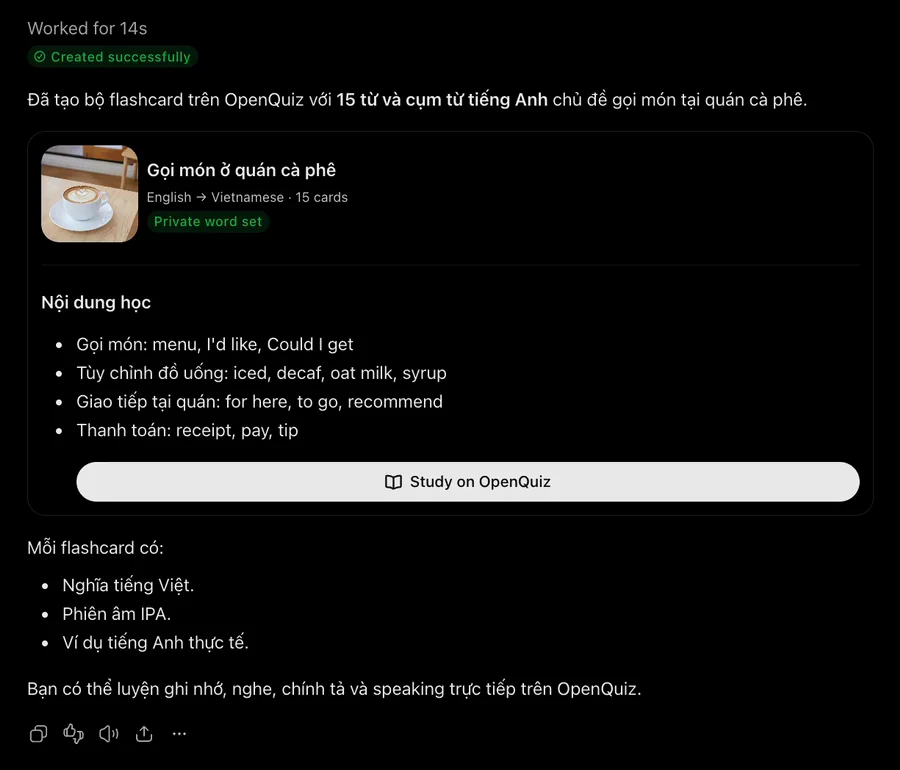
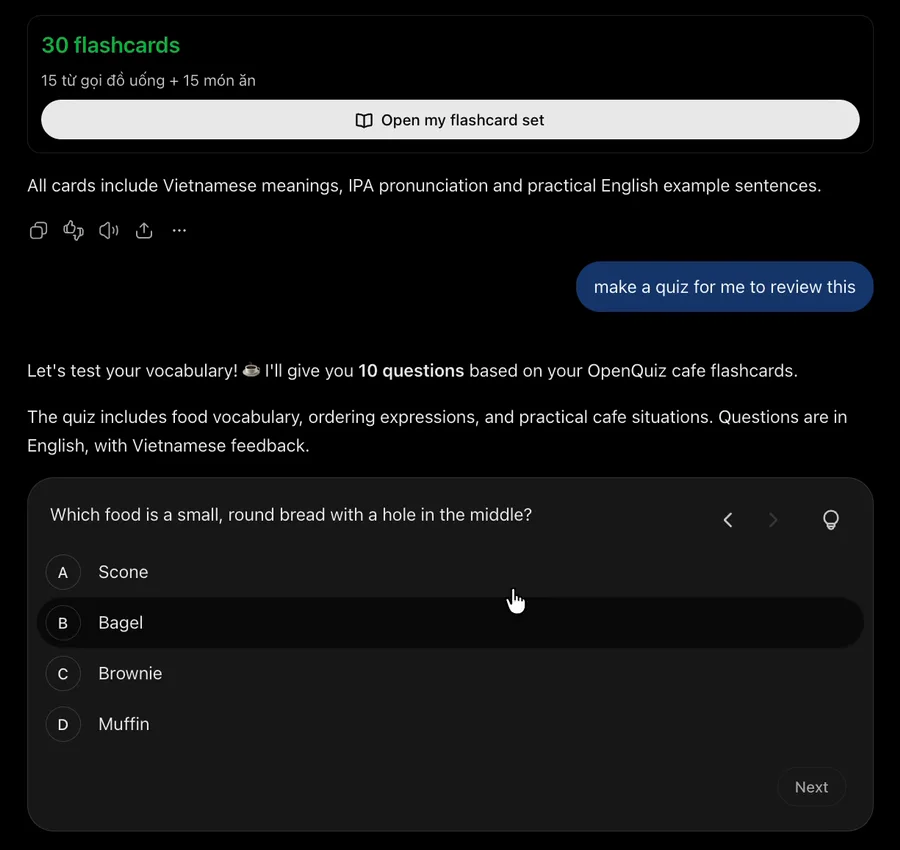
These two screenshots are from a real conversation: ChatGPT creates a set, then turns it into a quiz.
Five things to try, with real results
The screenshots show the basics. The five examples below go further. They follow one learner who is getting ready for a week in Tokyo. We ran every step through the plugin's own tools on a test account on November 25, 2026. The assistant wrote the cards; the numbers are what OpenQuiz returned. The wording of ChatGPT's replies will differ from one conversation to the next.
Demo 1
Build a learning path for a goal
A learning path is an ordered series of sets. You study the first set, then the next, until you reach the goal. One request creates the path and all of its sets.
Create a learning path of Japanese vocabulary for a one-week trip to Tokyo: 4 sets of 8 words, meanings in English.
Saved in OpenQuiz
Japanese for a Tokyo trip · learning path · 4 sets · 32 cards · private
- Trains and stations (8 cards): 駅 station, 電車 train, 地下鉄 subway, and 5 more
- At the hotel (8 cards): 予約 reservation, 部屋 room, 泊まる to stay overnight, and 5 more
- Eating out (8 cards): 注文 order, お会計 bill, ...をください a polite request for something, and 5 more
- Shopping and paying (8 cards): いくら how much, 現金 cash, お土産 souvenir, and 5 more
Every card is written the way OpenQuiz uses it. The term is read aloud and typed in dictation, the meaning is the quiz answer, and the example becomes listening and fill-in exercises:
| Term | Reading | Meaning | Type | Example |
|---|---|---|---|---|
| 駅 | eki | station | noun | 駅はどこですか。 |
| 泊まる | tomaru | to stay overnight | verb | 三日間泊まります。 |
| ...をください | ... o kudasai | a polite request for something | phrase | お茶をください。 |
The last row is a grammar card. A pattern is saved with its real words and three dots for the open slot, never as a formula such as "S + V", so the app can read it aloud and recognise it in your own sentences.
Demo 2
Add your own words to a set
Words you met in a class, a book or a video belong in your sets too. ChatGPT fills in the reading, the meaning and an example sentence, and OpenQuiz checks the set before it adds anything.
Add 切符, 改札, 乗り換え and 駅 to my Trains and stations set.
Saved in OpenQuiz
- 3 cards added, in your order: 切符 kippu ticket, 改札 kaisatsu ticket gate, 乗り換え norikae transfer
- 1 word skipped: 駅 was already in the set
- The set now has 11 cards
Demo 3
Practise in the chat and save the results
This is the part a plain chat cannot do. After the quiz, ChatGPT saves one result for each card you practised: mastered when you answered without help, learning when you were wrong or needed a hint. OpenQuiz then schedules each card for review.
Quiz me on 6 words from my Trains and stations set and save my results.
Saved in OpenQuiz
| Card | In the quiz | Saved as | Next review |
|---|---|---|---|
| 駅 eki | Right, easy | Mastered | In 4 days |
| 電車 densha | Right | Mastered | Tomorrow |
| 地下鉄 chikatetsu | Needed a hint | Learning | Tomorrow |
| 出口 deguchi | Right | Mastered | Tomorrow |
| 入口 iriguchi | Wrong | Learning | Tomorrow |
| 乗る noru | Right, easy | Mastered | In 4 days |
6 results saved, 6 cards scheduled for review. Set progress: 4 mastered, 2 learning, 5 not learned yet. The 6 cards count toward today's study total.
Open the set in the OpenQuiz app afterwards and it is in the same state as if you had studied there. The cards you missed come back first.
Demo 4
Review what is due, and move a review
ChatGPT can read your review queue, across every set or for one set. Right after the quiz above, nothing was due yet:
What do I have to review today?
From OpenQuiz
0 cards are due today. Four cards come back tomorrow and two in 4 days.
When your week changes, the schedule can change with it:
I am travelling tomorrow. Move 地下鉄 and 入口 to three days from now.
Saved in OpenQuiz
2 reviews rescheduled. 地下鉄 and 入口 are now due in 3 days. The other four cards keep their dates.
On any later day, one sentence starts a review session: "Quiz me on the OpenQuiz cards that are due for review today."
Demo 5
Edit cards, and delete only after you say yes
Cards, set titles and the order of the sets in a path can all be changed from the chat. An edit sends only what changes:
In my hotel set, change the example for 泊まる to 友達の家に泊まります。
Saved in OpenQuiz
1 card updated in "At the hotel".
Deleting takes two steps. The first request changes nothing. It returns exactly what would be removed, and ChatGPT has to ask you:
Remove カード from my shopping set.
From OpenQuiz, before anything is deleted
"Nothing was changed. This permanently deletes 1 card(s) from the set "Shopping and paying" ("カード"), with their review schedule."
Yes, delete it.
Saved in OpenQuiz
1 card deleted. "Shopping and paying" now has 7 cards.
The same rule covers deleting a whole set, deleting a learning path, and removing cards from spaced repetition.
More prompts that work
- "Make a flashcard set of 20 Japanese words for a trip to Tokyo."
- "Create a learning path of English vocabulary for a job interview."
- "Turn the new words from this article into an OpenQuiz set." (then paste the article)
- "Which cards in my hotel set am I still learning?"
- "Rename my cafe set to Coffee shop English."
- "Put the restaurant set before the hotel set in my Tokyo path."
You do not have to name OpenQuiz every time. ChatGPT uses an installed plugin when your request fits it, such as saving words to study later or reviewing saved cards. A one-off translation or a grammar question is answered by ChatGPT alone.
How to add OpenQuiz to ChatGPT
- Open the OpenQuiz page in the ChatGPT plugin directory. You can also open Plugins in the ChatGPT sidebar and search for "OpenQuiz".
- Select Install plugin, then Connect.
- A page on openquiz.ai opens. Sign in to your OpenQuiz account, read what ChatGPT will be able to do, and tap Allow. If you are new to OpenQuiz, create your free account at openquiz.ai first.
- Back in ChatGPT, ask for a set or a learning path. To call the plugin directly, type @OpenQuiz or pick it from the + menu.
- Open the link ChatGPT returns to study in OpenQuiz on the web, iOS or Android.
ChatGPT lists plugins on the web, desktop and mobile. According to OpenAI's help center, whether you can install a particular plugin depends on your ChatGPT plan, workspace, role and region.
What is free and what is counted
| Action through ChatGPT | Free OpenQuiz account | Premium account |
|---|---|---|
| Reading your own word sets: listing sets, reading the cards of a set | Unlimited | Unlimited |
| Everything else: creating and editing sets and learning paths, saving study results, the review schedule | 10 uses in total, shared by all of these actions | Not counted |
The 10 uses do not reset. The page where you tap Allow shows how many you have left, and you can ask ChatGPT for the number at any time. Premium accounts have a safety cap of 300 actions a day, which exists only to stop abuse. Studying in the OpenQuiz app itself is not affected by any of this; the plans are on the pricing page.
Privacy and control
- Private by default. Every set and path ChatGPT creates is private until you choose to share it in OpenQuiz.
- Your account only. The plugin works inside the account you signed in with. It cannot read or change another user's private content.
- Three permissions, shown before you allow. Create, edit and delete your sets, cards and learning paths; view your sets, learning paths and study progress; save study results and adjust your review schedule.
- Nothing is deleted without a yes. See demo 5.
- Disconnect at any time. Open openquiz.ai/connect/mcp and tap Disconnect, or disconnect it in ChatGPT under Settings > Plugins.
What you type in ChatGPT is handled by OpenAI under its own policies. What is stored in your OpenQuiz account is covered by the OpenQuiz privacy policy.
For developers: it is an MCP server
The plugin is built on the Model Context Protocol, the open standard that lets AI assistants call outside tools. The OpenQuiz server is at https://mcp.openquiz.ai/mcp, uses OAuth sign-in, and exposes 20 tools for word sets, learning paths, study results and the review schedule.
Frequently asked questions
What is the OpenQuiz plugin for ChatGPT?
It is a ChatGPT plugin, released on November 25, 2026, that connects ChatGPT to your OpenQuiz account. ChatGPT can then create flashcard sets and learning paths, add or edit cards, quiz you, and save the results to your OpenQuiz progress and spaced-repetition schedule. OpenQuiz is a vocabulary app with flashcards, spaced repetition, dictation and speaking practice.
How do I add OpenQuiz to ChatGPT?
Open the OpenQuiz page in the ChatGPT plugin directory, select Install plugin, then Connect. Sign in to your OpenQuiz account on the page that opens and tap Allow. After that, ask ChatGPT for a flashcard set or a learning path.
Is the OpenQuiz plugin free?
Installing it is free. On a free OpenQuiz account, reading your own word sets through ChatGPT is unlimited, and all other actions share 10 uses in total. Premium accounts are not counted.
Can ChatGPT make flashcards and remember what I got wrong?
Yes, with the plugin installed. ChatGPT writes the cards and OpenQuiz stores them: each card has a term, a short meaning, the word type, the pronunciation and an example sentence. When you practise in the chat, ChatGPT can save each card as mastered or learning, and OpenQuiz schedules the next review.
Which languages does the plugin support?
More than 40 learning languages, including English, Japanese, Korean, Chinese (Simplified and Traditional), Spanish, French and German. Meanings are written in the language you choose.
Can I use my own word list?
Yes. Paste or type your words and ask ChatGPT to save them to a new or an existing set. Your words are kept in your order, and a word that is already in the set is skipped and reported instead of being added twice.
Can ChatGPT delete my sets or cards?
Only after you confirm. A delete request first returns exactly what would be removed and changes nothing. The deletion happens only after you clearly say yes in the conversation.
Who can see the sets ChatGPT creates?
Only you. Sets and learning paths are created as private and stay private until you choose to share them in OpenQuiz. You can disconnect ChatGPT at any time at openquiz.ai/connect/mcp.
Does it work on my phone?
ChatGPT lists plugins on the web, desktop and mobile; whether you can install one can depend on your ChatGPT plan, workspace and region. The sets you create open in OpenQuiz on the web, iOS and Android.
Try it with the words you need this week
Install the plugin, name a goal, and let ChatGPT build the path. Your reviews will be waiting in OpenQuiz.
Open OpenQuiz in ChatGPTThis article was written by OpenQuiz. Facts were checked on November 25, 2026. ChatGPT is a trademark of OpenAI; OpenQuiz is an independent product and is not affiliated with OpenAI.